

- Contents
DOCUMENT HISTORY
Version Date Comment 1.0 01/03/2021 Initial version. 2.0 24/04/2025 Adapted to SDMX 3.0. Extensions to controlled vocabulary. Clarified text. Introduction
According to the SDMX documentation, the Annotation is a construct that contains user or organisation-specific metadata. The Annotation construct in SDMX is available to most of the SDMX structural metadata artefacts. This facility is essentially a flexible extension mechanism allowing metadata to be added to an SDMX structural artefact. Annotations are often used to store metadata in artefacts when there is no specific place for that information in the SDMX information model. Presentation metadata is a prime example, such as a default presentation for a dataflow.
Note that whilst the SDMX Annotation has a specific structure (Title, Type, URL, Text) individual organisations are free to use these in any way and any combination they wish. However, an Annotation can only be processed in a meaningful way (i.e. other than viewing it) by systems that understand its semantics.
The main advantage of the Annotation is its flexibility as all properties can be tailor-made and there is no limit to their number. This can prove very useful for specific applications, such as dissemination tools. The main drawback is poor interoperability as Annotations convey no semantics and are not standardised. This means that organisations that want to exchange Annotations and process them automatically must agree upon, at least, a common naming syntax.
The aim of this guideline is to improve machine interactions by proposing a controlled vocabulary for the Type property of the SDMX Annotation construct and a recommended usage for the other properties that will greatly improve the interoperability of Annotations between SDMX-compliant organisations.
The Controlled Vocabulary referred to above will be maintained as a SDMX Concept Scheme stored in the SDMX Global Repository.
SDMX Information Model for the Annotation construct
SDMX 2.1
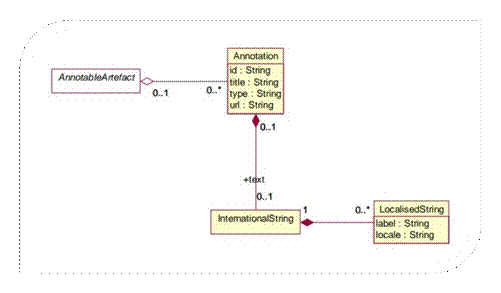
All classes derived from the abstract class AnnotableArtefact may have Annotations. The Annotation is used to convey extra information to describe SDMX constructs. This information may be in the form of a URL reference, a non-localised text, and/or multiple localised texts (represented by the one-to-many relationship to LocalisedString).
SDMX 3.0
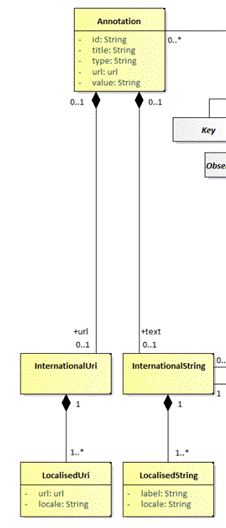
The URL can be localised which gives the advantage of linking to different resources depending on the language. It also removes the complexity of having to use AnnotationText in SDMX 2.1 to do this.
Properties of the Annotation construct
The properties of the Annotation construct are listed below. This information is taken from the SDMX official technical documentation.
Property Description Controlled vocabulary context id Identifier for the Annotation. It can be used to disambiguate one Annotation from another where there are several Annotations for the same annotated object. Id is set to @SDMX to identify it as part of the controlled vocabulary title A title used to identify an Annotation. A non-localised value for the annotation. Used when localisation is irrelevant. type Specifies how the Annotation is to be processed.
The type is often used as the usage context of the Annotation. The types are not enumerated1, as these can be specified by the Annotation creator. The definitions and use of Annotation types should be documented by their creator.Identifies the usage (e.g. images are type IMAGE) of the annotation. The type values are enumerated in the controlled vocabulary table. url A link to external descriptive text.
The url is a URI - typically a URL - which points to a resource. If a specific behaviour is desired, an Annotation type should be defined which specifies the use of this field more exactly.A non-localised URL reference to an external resource. Used when localisation is irrelevant. +url SDMX 3.0 and later. An annotation may have several localised URLs A localised URL reference to an external resource. +text An International String that provides the multilingual text content of the Annotation.
Text holds a language-specific string containing the text of the Annotation.
A localised value for the annotation. Introducing Standard Annotations
As stated earlier, a major drawback of the Annotation construct is the fact that they are not standardised for reuse when exchanging structural metadata. Annotations are containers for additional information relating to the object to which they are attached. This means that for an Annotation to be interpreted in the same way by exchange partners, a reference is needed that defines some standard behaviour and implementation.
This guideline proposes an Annotation controlled vocabulary and guidelines on their (re)use for SDMX implementers.
A standard Annotation can be defined as an Annotation that has an agreed definition in the SDMX community. Some of them, especially the general and display-related annotations also have a described behaviour. They allow diverse systems to parse the information and perform a specific action in response.
How to Identify Standard Annotations?
In order to be able to configure their applications to implement actions based upon standard Annotations, systems must know how to identify such Annotations. This is done by setting the Annotation id property to “@SDMX” which indicates that the Annotation is part of the controlled vocabulary described in the section List of Standard Annotations, and avoids using “@SDMX” for other usage contexts. For example, ORDER could be the order of codes (as described in this controlled vocabulary) or some kind of order number (a different usage).
The additional mandatory information to be provided is the type property that specifies the type of action to be implemented. There may be other mandatory property values depending on the type of the standard Annotation.
Examples
The green columns in the table below show example usages of standard Annotations. The orange “ORDER” column is not a standard Annotation because the usage context is not the same as the standard Annotation “ORDER”, therefore the id should not be “@SDMX”.
id* @SDMX @SDMX @SDMX Not @SDMX
This is a “customer order no.” which is a different use case than the ORDER standard Annotation which is a list order
title 1934245 type* NOT_DISPLAYED EXCLUDES ORDER ORDER +text en :10 fr :20 * denotes a mandatory information for standard Annotations
The Business value of Standard Annotations
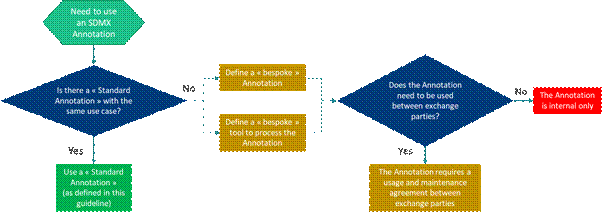
The following diagram explains the business value and decision process when deciding whether to use a standard Annotation. As can be seen, if they are used then a maximum reuse is made of the Annotation itself, tools and processes. If they are not used then bespoke Annotations, agreements, tools and processing are required to understand and make use of the information in the Annotation, and it (plus supporting tools, processes, etc.) is harder to reuse.
List of Standard Annotations
This section lists the standard Annotations with their typical usage contexts. This list will be expanded over time as new implementations and needs arise. When references to external standards are made (e.g. skos or xkos specifications), the reader is invited to consult the “References” section for more information.
The list of standard Annotations will be available from the SDMX Registry as artefact: SDMX:CS_ANNOT(*.*.*). Link: https://registry.sdmx.org/ws/public/sdmxapi/rest/conceptscheme/SDMX/CS_ANNOT/latest/?format=sdmx-2.1&detail=full&references=none
Note: There are several Annotations that are types of name or label, e.g. FULL_NAME, SHORT_LABEL, ORIGINAL_LABEL. These Annotations have specific use cases that are described in the tables below and should not be used to replace an artefact’s or item scheme item’s Name and Description property.
Relationships between Annotation properties
Text value defaults and specific locale values
Some use cases may benefit from having a single, default value for all locales/languages but also to set the value for certain locales. An example is ORDER where there may be a default list order for all locales but two locales have a specific order which is different from the default. In order to avoid having to state an order for every locale, the Annotation Title property may be used to state the default value, whereas the text property is used for the localised values.
Consider this annotation Example: An ORDER annotation type that is attached to a code item ACME. If both the Annotation Text and Annotation Title have values, then the Annotation Text value (e.g. en:10,es:20) is used for the localized values instead of the Annotation Title (e.g. 30) which would only be taken if the locale in the context is not found among the specified ones.
URL value defaults and specific locale values
SDMX 2.1 and earlier
In SDMX 2.1, the Annotation’s URL property is a single, non-localised value. There may be cases where different URLs are required for certain locales. In this case, it is recommended to use the Annotation text property and state the language and URL in an HTML fragment, for example:
fr:<a href=”https://someLink”>
When both a URL and text property for the locale exists, the text property overrides (is used instead of) the URL property.
SDMX 3.0 and later
Multiple URL localised properties were introduced in SDMX 3.0. Therefore, the URL work-around in the above paragraph is not recommended. The URL property should be used as shown in the table.
General and Display-related Annotation types
Annotation Type Use Case Where to attach +Text
Blue is optionalTitle
Blue is optionalSDMX 2.1:URL
SDMX >=3.0:+URL
Blue is optionalFULL_NAME Alternative name to be displayed for items in Item Schemes (e.g. Codelists, Concept Schemes, Category Schemes) whenever the item is displayed without its parent. For example, if a code list that has a hierarchy is displayed as a flat list, then this annotation may be used to provide sufficient context for the code. Concatenation of code + heading in NACE Rev.2.1
en: A0123 Growing of citrus fruitsItem in an Item Scheme <language>:<content>,<language>:<content>,…
Example:
en:Labour force (Employment)<content> REPLACE_NAME Replace each code name in a component by the value of another component in an observation or series A Dataflow or DSD <component Id to replace name>:<component Id to use name>
Example:
CUST_BREAKDOWN:CUST_BREAKDOWN_LBREPLACE_CONTENT Replace the content in a component by the value of another component in an observation or series A Dataflow or DSD <component Id to replace content>:<component Id to use content>
Example:
REF_AREA:M49_CODECOMPLEMENT Additional fixed text to be displayed in parenthesis after the code name.
E.g. Representation of Non-hazardous (NHAZW), hazardous waste (HAZW) in the European List of Wastes
en: 01 03 04* acid-generating tailings from processing of sulphide ore (HAZW)
en: 01 03 99 wastes not otherwise specified (NHAZW)Item in an Item Scheme <language>:<content>,<language>:<content>,…
Example:
en:See reference metadata<content> ORDER Explicit indication of a localised order of items in Items Schemes or artefacts (e.g. Codelist, Concept Scheme, Category Scheme, Dataflow, etc.) Either:
- an artefact, or;
- an item in an Item Scheme
<language>:<content>,<language>:<content>,…
Example:
en:10,es:20<content> TOTAL Code Item that represents a total value. If the attachment is:
- to a Code, the Annotation Text is optional and may contain an explanatory text;
- to a Codelist, the Annotation Title is mandatory and includes the code(s) that represent a total
Either:
- a Code Item that represents a total value, or;
- a Codelist to specify the code(s) with the total
<language>:<explanatory text>,
<language>:<explanatory text>,…Attached to Code Item: <blank>
Attached to Codelist: <code>,<code>,…DRILLDOWN Denotes the concept that specifies whether observations are at the aggregate level or a drilldown. Either:
- A Dataflow or DSD
<concept Id>
Example:
DD_DIM (this concept should be hidden using the NOT_DISPLAYED Annotation below)DEPRECATED Indication that an Item in an Item Scheme or an artefact is deprecated.
For an item scheme item, the annotation value provides a replacement name for the code name.
For an artefact, the URL points to the replacement artefact. May be used in conjunction with SUPERSEED where the replacement artefact references the replaced artefact.
Suggestion to use a controlled vocabulary
url: <http://publications.europa.eu/resource/authority/concept-status/CURRENT>
url: <http://publications.europa.eu/resource/authority/concept-status/DEPRECATED>
or
TITLE: true (false)Either:
- an artefact, or;
- an item in an Item Scheme
For item scheme item:
<language>:<content>,<language>:<content>,…
Example:
en:deprecated,fr:obsolète<content> For artefact:
<see section URL value defaults and specific locale values>DEFAULT Indication that an item in an Item Scheme or artefacts is to be selected by default.
The Annotation defines a selection so that a pre-defined default subset of data can be processed (e.g. visualised, extracted) instead of the entire dataset
- Item in ItemScheme, or;
- DSD, or;
- a Dataflow
Note: A DEFAULT Annotation attached to a later level in this list supersedes that attached to an earlier level. E.g., a DEFAULT Annotation attached to individual Codes in Codelists is only to be used when there is no DEFAULT Annotation attached to the Dataflow nor to the DSD, and those of DSDs are only to be used when there is no DEFAULT Annotation attached to the Dataflow.
Attached to:
- DSD or Dataflow:
<concept>=<code>+<code>+…,<concept>=<code>+<code>+…Example: FREQ=A+Q,TIME_PERIOD_START=2013-01,TIME_PERIOD_END=2018-12
IMAGE A visual identity to associate to Item Scheme Items or artefacts Either:
- an artefact, or;
- an item in an item scheme
For localised content in SDMX 2.1
<language>:<HTML containing URL to the resource>,
<language>:<HTML containing URL to the resource>,…
Example:
en:<a href=”https://sdmx.org/wp-content/uploads/SDMX_map_small-220x220.jpg”>
See section URL value defaults and specific locale values.
Example:
https://sdmx.org/wp-content/uploads/SDMX_map_small-220x220.jpg
DRILLDOWN_CONCEPTS Concepts to be displayed in a drilldown operation Dataflow or DSD <concept Id>,<concept Id>,…
Example :
DONOR,RECIPIENT,YEAR,PROJECT_ID, OBS_VALUE,DESCRIPTION,OWNER
NOT_DISPLAYED Used to hide components or their values in the presentation Either:
- a Dataflow or DSD, or;
- an Item in an Item Scheme
Attached to Item in Item Scheme: <blank>
Attached to Dataflow or DSD:
<concept Id>,<concept Id>,…
Example :
DD_DIM (to hide drilldown control concept)
LAYOUT_ROW Dimensions to be presented in rows (concepts on y-axis) Either:
- an artefact, or;
- a Dimension
Attached to Dimension: <blank>
Attached to Dataflow or DSD: <dimension Id>,<dimension Id >,…
Example:
REF_AREA,MEASURE
LAYOUT_COLUMN Dimensions to be presented in columns (concepts on x-axis) Either:
- an artefact, or;
a Dimension
Attached to Dimension: <blank>
Attached to Dataflow or DSD: <dimension Id>,<dimension Id>,…
Example:
TIME_PERIOD
LAYOUT_FLAG Indication that an attribute and its attribute value should be presented as a flag Dataflow <concept Id>,<concept Id>,...
Example:
OBS_STATUS,CONF_STATUS
LAYOUT_NOTE Indication that an attribute and its attribute value should be presented as a note Dataflow <concept Id>,<concept Id>,...
Example:
OBS_STATUS,CONF_STATUS
METADATA
Links an MSD directly to a DSD. Can be used to overcome the complexities of reference metadata linkage DSD MSD URI, e.g. urn:sdmx:org.sdmx.infomodel.metadatastructure.MetadataStructure =OECD:MSD_REF_METADATA(1.0) LAYOUT_ROW_SECTION Dimension to be presented as a break-down concept at a third hierarchical level above columns and rows. Either:
- an artefact, or;
- a Dimension
Attached to Dimension: <blank>
Attached to Dataflow or DSD: <dimension Id>,<dimension Id>,…
Example:
SEX
EXT_RESOURCE A localised link to an external resource associated to the annotated artefact. For example, an ontology item
a methodology en:<a href:"https://ec.europa.eu/eurostat/web/waste/methodology">
Any SDMX object For localised content in SDMX 2.1
<language>:<HTML containing URL to the resource>,
<language>:<HTML containing URL to the resource>,…
Example:
en:<a href=”http://rdf-vocabulary.ddialliance.org/xkos#depth”>
See section URL value defaults and specific locale values.
Example:
http://rdf-vocabulary.ddialliance.org/xkos#depth
COMBINED_CONCEPTS Comma-separated list of concept IDs to show as a concatenated label.
The listed concepts’ item contents may be concatenated to generate the target concept.
Multiple target concept combinations can be defined by separating the target concepts by ;
Dataflow or DSD <language>:<display name>,
<language>:<display name>
e.g. COMBINED_UNIT_MEASURE:PRICE_BASE, UNIT_MEASURE;COMBINED_MEASURE:MEASURE, REF_SECTOR{(en):Combined unit of measure;Combined measure}{(fr):Unité de mesure combinée;Mesure combinée}
Codelist and Statistical Classification-specific Annotations
The categories below are used widely, for example by the European Statistical System (ESS), and the United Nations Statistics Division for its central framework classifications ISIC42 and CPC3.
Concept Scheme SDMX:CS_ANNOT
The Concept Scheme for standard Annotations will have the Maintenance Agency SDMX and will describe the following properties for each Annotation. For the information represented by Annotations, the value is in AnnotationTitle apart from the URL property where it is in AnnotationURL.
Property Representation in Concept Description Code Concept Id The Annotation Type column, e.g. NOT_DISPLAYED, EXCLUDES Name Concept Name Short description of the standard Annotation derived from the “Use case” column Representation Concept Core Representation Allowable type or format for the Annotation Description Concept Description The information in the “Use case” column. Possible to add more contextual information. Specific details can be described here, such as if the value should be in AnnotationText or AnnotationTitle Artefact(s) Annotation Type: Artefact(s) The information in the “Where to attach” column URL Annotation Type: URL The Annotation URL column. The value is in URL Example of a Concept
Concept Id NOT_DISPLAYED Concept Name Used to hide components or their values in the presentation Concept Core Representation /TextFormat@textType="String" Concept Description To hide dimensions and attributes in a display (e.g. a table). For example, if they have only one allowed, available or selected value Concept: Annotation: Type: Artefact(s) Either a Dataflow or DSD, or an item in an item scheme SDMX-ML of the Example
<str:Concept id="NOT_DISPLAYED">
<com:Annotations>
<com:Annotation>
<com:AnnotationTitle>Either a Dataflow or DSD, or an item in an item scheme</com:AnnotationTitle>
<com:AnnotationType>Artefact(s)</com:AnnotationType>
</com:Annotation>
</com:Annotations>
<com:Name xml:lang="en">Used to hide components or their values in the presentation</com:Name>
<com:Description xml:lang="en">To hide dimensions and attributes in a display (e.g. a table). For example, if they have only one allowed, available or selected value</com:Description>
<str:CoreRepresentation>
<str:TextFormat textType="String"/>
</str:CoreRepresentation>
</str:Concept>References
- Formalization of the Structure and Content of Statistical Classifications
- SDMX Global Registry
- SDMX Glossary 2.1
- SDMX Standards, “Information Model: UML Conceptual Design”, version 2.1
- SKOS Specification
- XKOS Specification